Parental Control - Kroha
- 4.6
- Rating
- 1.00M
- Installs
- Free
- Price

 Analysis by App-foxy
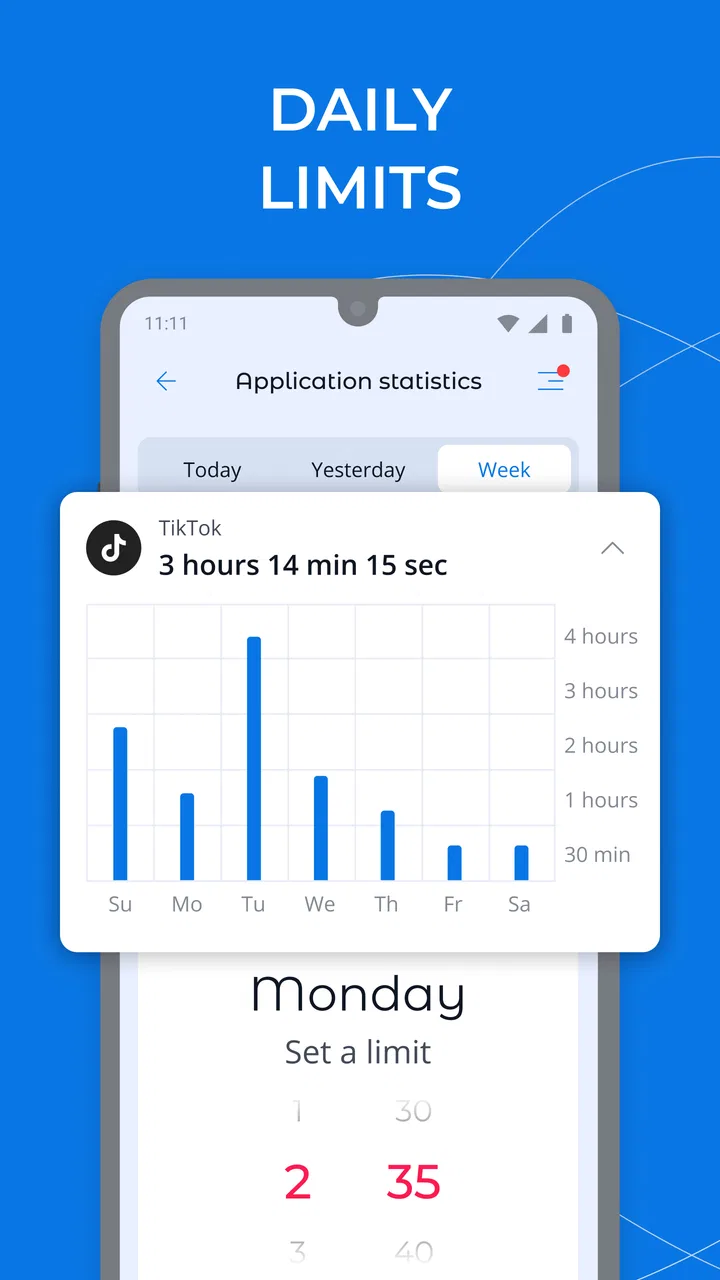
Managing a child’s phone is rarely about finding one perfect setting. It is usually a matter of balancing safety, independence, homework, sleep, and family trust without turning every evening into an argument. I spent time looking at how Parental Control - Kroha fits into that balance, and my impression is that it is most useful as a practical supervision tool rather than a magic solution. It brings screen-time limits, a child-focused mode, and sound monitoring into one parenting app, which can be more convenient than switching between several separate controls.
The app is developed by Parental Control Kroha and belongs to the parenting category. It is free to install, with optional in-app purchases ranging from $0.99 to $39.99 per item. That combination makes it easy to try before committing, although families should pay attention to which functions require payment during setup. It is rated for Everyone, runs on Android 7.0 or later, and the current version is 3.14.4.
How Kroha feels in everyday use
I find the most useful way to judge Kroha is to ask what a parent can actually see and decide, rather than assuming that a safety label settles questions of trust. In this section, I’ll focus on how its everyday controls can fit a family routine, and why agreeing on their purpose before turning them on matters as much as choosing the limits.
You May Also Like

 Blood Strike: 2.5 Anniversary
Blood Strike’s Loadouts Turn Every Drop Into a Tactical Gamble
A close look at Blood Strike’s custom loadouts: how fast access to signature weapons reshapes its battle royale rhythm, rewards preparation, and narrows the gap between fights.

 Pandora - Music & Podcasts
Pandora’s Music Is Easy to Start, but Harder to Recover
Pandora’s strength is its low-effort path from a seed to a station. Its weak spot is how much confidence it asks you to place in connection, setup, and quiet recovery.

 8 Ball Pool
 Is Built on Rivalries, Rematches, and Routine
A close look at the rivalries, rematches, shared routines, and unanswered safety questions that turn a quick pool match into a persistent mobile community.

 Samsung Music
’s Quiet Strength Is Playing What You Already Own
Its reach comes less from spectacle than from dependable access to a personal library. That simplicity is both the app’s strongest retention engine and its ceiling.

 AccuWeather: Weather Radar
AccuWeather Review: A Quick, Clear Forecast for Everyday Decisions
For everyday plans, the best forecast is the one you can understand quickly. AccuWeather makes rain timing, radar, and local conditions easy to act on, with a few trade-offs.

 Hill Climb Racing
Why Hill Climb Racing Still Turns Crashes Into One More Run
A tiny car, a bumpy hill and one more upgrade: Hill Climb Racing keeps resurfacing because its simple chaos makes every near-miss feel personal.
More From Our News Desk



Speed expectations before you rely on it
Parental-control software has a different performance standard from a game or a video editor. I do not expect it to feel flashy; I expect settings to be understandable, restrictions to behave predictably, and the parent view to avoid unnecessary delay. Kroha’s appeal is that its main purpose is easy to grasp: supervise the child’s surroundings, limit screen time, and provide a controlled mode for kids.
That focused purpose helps the app feel less intimidating for parents who do not want to build a complicated technology system. The important work happens during configuration, not through constant tapping. I would approach the first setup carefully, because a rushed configuration can create confusing rules later. Decide what the child needs the phone for, when the device should be available, and which limits are genuinely realistic before switching everything on.
A useful starting point is to create a weekday routine rather than applying the strictest possible restriction. School communication, transport, family calls, and homework may all require access at different times. A rule that blocks too much can make the app appear unreliable when the real problem is that the schedule does not match the child’s day. The best result comes from treating limits as a routine, not as a punishment button.
The sound-monitoring function also needs sensible expectations. It is intended to help parents stay aware of the child’s surroundings, but it should not replace a conversation about privacy and responsible use. I would explain to an older child what the family is using the feature for and when it may be relevant. That makes the tool part of a safety plan instead of a hidden form of surveillance.
What happens during heavy-use moments
The most demanding situations are not necessarily moments when the child is using the phone for hours. They are the moments when several family needs collide: a limit is reached, the child needs access for a legitimate reason, a parent wants to check the situation, and the device is moving between networks or locations. This is where a parental-control app has to be convenient enough for real life.
I would not recommend making Kroha the only layer of protection for a very young child. A child mode can support boundaries, but younger users still need an adult nearby to explain why an app is unavailable or why the phone has changed behavior. If the child regularly needs exceptions, parents should build those exceptions into the routine where possible rather than changing rules in frustration every day.
For a realistic example, imagine a child who normally finishes screen time after dinner but needs the phone later to contact a parent after sports practice. A rigid household approach might lead to repeated unlocking and relocking. A better workflow is to agree on that situation in advance, keep the normal evening limit, and use a clear family rule for necessary communication. Kroha can support that arrangement, but it cannot decide whether a particular request is genuinely important.
Heavy use can also expose the difference between monitoring and conversation. If a parent sees a worrying situation through a supervision feature, the next step should be a calm check-in, not an automatic escalation. The app is strongest when it reduces uncertainty and helps adults respond; it is weaker when families expect it to solve trust, bullying, or online judgment by itself.
Reliability depends on the whole setup
When people ask whether a parental-control app is reliable, they often mean two different things. They want the limits to remain consistent, and they want the parent to receive useful information when it matters. Both depend on more than the app’s interface. The child’s device, the parent’s device, the operating system, connectivity, and the way the rules were configured all influence the experience.
I would test the arrangement during an ordinary day before relying on it for an important safety situation. Set a modest limit, check how the child experiences it, and confirm that the parent understands where to adjust the rule. This small trial is more valuable than assuming that a downloaded app will automatically fit every family’s routine.
Recovery is another area where preparation matters. Parents should know how to handle a legitimate exception, how to review a rule that was too strict, and what to do if the child’s phone behaves differently after a system change. Keeping the conversation open makes recovery easier because the child is more likely to report a problem instead of trying to work around it.
I also prefer a gradual rollout. Start with one or two goals, such as bedtime access and a predictable daily allowance, then add more supervision only when the family understands the effect. This approach makes it easier to identify whether a problem comes from the app, the device, or an unrealistic household rule. It also avoids the common mistake of introducing so many restrictions that nobody remembers why each one exists.
The app has a substantial user base, with over one million installs, and its average rating is 4.5 from around 32 thousand ratings. Those figures suggest that many families find the general concept useful, but they should not be treated as a guarantee that every device or parenting style will work equally well. Parental-control tools are especially sensitive to differences in age, family expectations, and phone habits.
Device constraints are part of the decision
Kroha supports Android devices starting with Android 7.0, which makes it relevant to families using older phones as children’s first devices. That is helpful if you are passing down a phone rather than buying a new one. At the same time, an older operating system may have different background behavior and system settings from a newer phone, so I would test the exact child device instead of assuming that two Android phones will behave identically.
Resource demands matter more on an older or budget phone. A child’s device may already be handling messaging, school tools, music, and games, so any supervision app becomes part of a crowded environment. I would avoid judging performance from the parent phone alone. Check the child’s phone for responsiveness during normal use, battery behavior, and whether the restrictions fit naturally into the day.
There is also a practical cost to constant supervision: attention. If a parent checks every detail, the app can create more work instead of reducing it. I see Kroha as better suited to setting broad boundaries and responding to meaningful concerns than to watching every small action. Families looking for a completely hands-off solution may find that no app can provide the reassurance they want without adult involvement.
The free entry point is useful for trying the basic experience, but families should review the in-app purchase choices before building their whole routine around a paid function. The range of optional purchase prices is wide, from less than a dollar to nearly forty dollars per item, so the practical question is not simply whether the app is free. It is whether the functions your family actually needs remain within a comfortable budget.
Who will benefit most from it?
I think Kroha is a good match for parents introducing a first smartphone, especially when the main goals are consistent screen-time boundaries and a child-friendly controlled environment. It can also suit families who want sound awareness as part of a broader safety conversation. The single-app approach is convenient for parents who would rather not combine several unrelated tools.
It may be particularly useful when parents and children need a visible routine. For example, a household can agree that the phone is available for school and communication during the day, limited during homework, and put aside at night. The value is not only in blocking access; it is in making the expectation clear enough that the child knows what will happen.
I would be more cautious for teenagers who already manage their devices responsibly and would view detailed supervision as a serious breach of trust. In that situation, a family agreement plus the operating system’s own screen-time controls may be a better fit. Kroha also may not be right for parents who want advanced educational reports, extensive device administration, or a highly customized system with many independent profiles and rules.
It is not a substitute for teaching children how to recognize risky messages, protect personal information, and ask for help. A restriction can reduce exposure, but it does not build judgment. The strongest use of the app is alongside clear conversations, agreed consequences, and regular reviews as the child becomes more independent.
Practical setup habits that make a difference
Before installing it, write down the family’s actual goals in plain language. “Less phone use” is too vague. “No entertainment during homework” or “the phone stays available for calls from parents” gives you a much better basis for configuration. This prevents the app from becoming a collection of arbitrary blocks that the child cannot understand.
Next, use a trial period with the least intrusive settings that can achieve the goal. Watch for false conflicts: a child may appear to be resisting a limit when the real issue is that the schedule overlaps with travel, schoolwork, or family communication. Adjust the routine before adding more restrictions. That is a more reliable way to improve the experience than repeatedly changing settings after arguments.
For sound monitoring, agree on the purpose and boundaries beforehand. A safety feature is easier to use responsibly when everyone understands that it is not intended to replace trust or private family discussion. I would also avoid presenting it as proof that the child is doing something wrong. Used carefully, it can provide context; used carelessly, it can damage the relationship the parent is trying to protect.
Finally, review the setup when the child’s schedule changes. A rule designed for school holidays may be wrong during term time, and a routine that works for a younger child may feel excessive later. The app should evolve with the family rather than becoming a permanent set of restrictions that nobody revisits.
My performance and reliability verdict
After considering the app as a daily parenting tool, I see its main strength in its focused combination of supervision, screen-time management, and child mode. It is not trying to be a general family dashboard. That makes the purpose clear and gives parents a straightforward place to begin, particularly when a child is moving into regular smartphone use.
Its limitations are equally important. The quality of the experience depends on careful setup, a compatible Android device, realistic schedules, and communication with the child. Parents should not assume that an app alone will prevent every problem or that monitoring can replace teaching. Older devices may also deserve extra testing before the family relies on the arrangement.
Parental Control - Kroha is free to start, has an Everyone age rating, and is maintained in version 3.14.4 by Parental Control Kroha. It has been available since May 2018, and its large install base shows that the approach has broad appeal. I would recommend trying it to families that want a practical first layer of structure, especially if they are willing to test rules and explain them clearly.
My final opinion is positive but measured: Kroha works best as a calm framework for family boundaries, not as an invisible replacement for parenting. If your priority is a manageable way to organize screen time and add supervision around a child’s phone, it is worth exploring. If your priority is deep device administration, highly detailed reporting, or maximum independence for a mature teenager, a lighter built-in alternative may be more appropriate.
FAQs for Parental Control - Kroha
01What features does Parental Control - Kroha offer?
Parental Control - Kroha provides a comprehensive suite of features including app monitoring, screen time management, location tracking, and web filtering. It allows parents to remotely manage their child's device usage, ensuring a balanced digital lifestyle. The app also provides detailed reports on device activity, helping parents stay informed.
02Is Parental Control - Kroha compatible with both Android and iOS devices?
Yes, Parental Control - Kroha is compatible with both Android and iOS devices. This cross-platform availability ensures that parents can monitor and manage their child’s activities regardless of the device they are using, providing flexibility and ease of integration into family routines.
03How does the app ensure the privacy of my child's data?
Parental Control - Kroha prioritizes user privacy by employing robust encryption methods to safeguard personal data. The app ensures that all information, including location and activity data, is securely stored and accessible only to authorized users. It complies with privacy regulations to protect your child's information.
04Can I set specific usage limits for different apps on my child's device?
Yes, Parental Control - Kroha allows you to set specific usage limits for individual apps. This means parents can tailor restrictions according to the educational or entertainment value of each app, promoting productive device use while minimizing distractions from non-essential applications.
05Is there a free version of Parental Control - Kroha, or is it subscription-based?
Parental Control - Kroha offers both a free version with basic features and a premium subscription that unlocks advanced functionalities. The premium version includes enhanced monitoring tools and customizable settings, providing a more comprehensive parental control experience. Users can choose the plan that best fits their needs.
Pros
- User-friendly interface for easy setup.
- Comprehensive app usage statistics.
- Real-time location tracking feature.
- Customizable screen time limits.
- Supports multiple devices per account.
Cons
- Limited free version features.
- Occasional lag in app blocking.
- GPS tracking drains battery quickly.
- Requires permissions that may raise privacy concerns.
- No web filtering on some browsers.

Parental Control - Kroha
Gallery